
3.2 C++ Functions and Flow

Namespaces
Section titled “Namespaces”In the development of large C++ applications that involve several different programmers, two programmers could use the same name for a global variable or class, representing related concepts. This would cause complications as such conflicts can have unpredictable results (more likely compiler errors). So, while individual code segments would work independently, when they are brought together errors may result.
The namespace concept was introduced during the standardisation of C++, to allow the programmer to define a namespace that is limited in scope. When writing C++ applications we can make it explicit that we are using the standard namespace by a using directive:
using namespace std; // i.e., I want to use the declarations and // definitions in the "Standard Library" // namespaceat the beginning of our code segments, however this can be considered poor practice in certain circumstances as the entire contents of the namespace are included. The alternative is to make it explicit that we were calling the standard cout output stream by typing:
std::cout << "Hello World!" << "\n";which states that cout which we wish to use is defined in the standard library’s std namespace.
It is possible to include the exact namespace member to be included by a using declaration:
using std::cout;would allow us to use cout without including all names in the std namespace.
It is possible to create your own namespace, using namespace grouping. For example, here I have created a namespace called MolloySpace that contains a function called testAdd(). To use this function in the code below you have to use the “using namespace” directive or “using” declaration, otherwise the code will not compile.
#include<iostream>
namespace MolloySpace {    float testAdd(float a, float b) { return a+b; }
    class Time {        public: //etc.    };}
using std::cout;// using std::endl; (deprecated in favor of \n)
using namespace MolloySpace;//using MolloySpace::Time;//...
The source code for this is in NameSpaceTest.cpp
Which should you use? To get the full use of namespaces, it is good to avoid:
using namespace SomeNameSpace;Placing such a using directive at the start of every file is the same as placing all definitions in the global namespace — exactly what namespaces were invented to avoid! So, this approach gives little value out of the namespace mechanism. If you place the using directive inside a block, then it only applies to that block; a more sensible approach. The using declaration is preferable, with the following statement:
using MolloySpace::f;at the start of a file, allows you to omit names that are in the namespace but that are not used, avoiding potential name conflicts. It also makes clear to other programmers the names you are using, and it is not as verbose as always qualifying a name with notation of the form MolloySpace::f on every usage.
Comments
Section titled “Comments”Comments are a necessary evil! A good programmer uses useful comments efficiently in their code. In fact, you may find that sometimes it may clear your head to lay out an algorithm by writing the comments first, before writing even one line of code. Modern software engineering emphasises self-documenting code. Before writing a comment, ask yourself if a clearer variable name or a more descriptive function name could eliminate the need for the comment altogether. (See Figure 1)

Figure 1. Comments should be helpful but not obvious.
- Explain “Why,” Not “What”: The code should tell you what is happening; comments should explain why it is happening — especially for non-obvious logic, performance trade-offs, or complex business rules.
- Avoid “Stale” Comments: Comments that describe the code but are not updated when the code changes are worse than no comments at all. Always update comments when you change the logic they describe.
- Don’t Comment Out Code Long Term: Instead of using block comments to “save” old code, rely on version control (like Git). This keeps the codebase clean and prevents confusion about whether the code is still relevant.
- Documentation Comments: While C++ doesn’t have a single built-in standard like Javadoc, tools like Doxygen are the industry standard. They typically use
///or/** ... */to generate professional API documentation automatically from your source code.
Excluding Doxygen comments, we have two types of comments in C++ (i) End of line comment and (ii) block comments in C++.
  x = x * 4.533;  // explain what you are doing                  // end of line commenting
  /* An example of block commenting */  y = 5 * 3;
  /* TODO: This section needs to be fixed! Derek 25/12/26  j = j * 32.7 + 6;  k = k * j + 1;  */
Important: You cannot nest /* .. */ comments by default!
Knowledge Check
Section titled “Knowledge Check”Which of the following are benefits or characteristics of using namespaces in C++?
What is the difference between a 'using' declaration and a 'using' directive?
Regarding C++ comments, which of the following statements is true?
Functions in C++
Section titled “Functions in C++”Functions are the fundamental building blocks of modular C++ applications. They allow for functional decomposition, which is the process of breaking a complex problem into smaller, manageable, and testable sub-tasks. By encapsulating logic within a function, you create an abstraction that can be reused throughout an application, reducing code duplication and improving maintainability.
In C++, a function is defined by its signature, which includes its name, return type, and parameter list. Modern C++ (C++11 and later) has introduced more flexible ways to define functions, such as trailing return types (auto func() -> int) and the [[nodiscard]] attribute, which encourages better error handling by warning the programmer if a significant return value is ignored.
For advanced developers, it is important to distinguish between the function declaration (the prototype, often found in header files) and the function definition (the actual implementation). Keeping functions concise (ideally focusing on a single, well-defined responsibility) is a core principle of clean software architecture. We need to discuss this point in detail when we cover separate compilation in the next chapters.
In the next sections, we focus on the mechanisms for passing values to functions. Understanding these differences is critical; it is often the deciding factor between a program that is merely functional and one that is optimised for performance in a real-time application.
Pass by Value
Section titled “Pass by Value”So to write a simple function that returns a single value we can use:
// Using Functions
#include<iostream>using namespace std;
float addInterest(float val, float rate){  //1   return val + (val * (rate/100)); //2}
int main() {    float balance = 5000;    float iRate = 5.0;
    balance = addInterest(balance, iRate); //3    cout << "After interest your balance is "         << balance << " Euro." <<  "\n";    return 0;}
The source code for this is in Functions.cpp
- The function is defined to return a
floatvalue, so it is required to do so. In this case the return value will be the new balance. - The return keyword defines the return value. Since the return type has been specified as float the return value must also be of
floattype. - The return value of the function is assigned to the left-hand side of the
=. In this case the balance value has been modified to update the balance in themain()function.
This will result in the output:
After interest your balance is 5250 Euro.Some points about functions:
- If a function has a return type then it must return a value!
- The
voidkeyword implies that no return value is expected. In other contexts, such asvoid*(discussed later), it represents a pointer to an unspecified type. - In standard C++, there is no default return type; you must specify one (e.g.,
intorvoid). const char*is used for C-style strings (pointer to constant characters).- In C if we specified a function with no parameters, e.g.
void someFunction()it actually meant that there was an undetermined number of parameters, thus disabling type checking. In C++ this means that there are zero parameters.
The previous code segment passed values to the function using pass by value. In this case you are really passing the value of the variables balance and iRate, so in this case the numbers 5000 and 5.0. It is only possible to have one return value when passing by value (However, this value could be a pointer to an array). If we wish to have multiple return values, or wish to modify the source then we can pass by reference.
Pass by Reference
Section titled “Pass by Reference”This example is the same as the previous example except this time we are passing by reference:
// Using Functions (with Pass by reference)#include<iostream>using namespace std;
void addInterest(float &val, float rate) { //1 2    val = val + (val * (rate/100)); // 3}
int main() {    float balance = 5000;    float iRate = 5.0;
    addInterest(balance,iRate); // 4    cout << "After interest your balance is "         << balance << " Euro." << "\n";    return 0;}
The source code for this is in Functions2.cpp
- The function is defined not to return a value, so the return type is set as
void. We do this to prove that the pass by reference actually works. - You will notice that the first parameter
valhas been changed to have an&before it. This is notation to signify that thevalparameter is to be passed by reference, not by value. - You will notice the return keyword is not used, as the return type is set to
void. The value is not returned, rather it is modified directly. So when the value ofvalis modified in theaddInterest()function it modifies the value ofbalancedirectly. - The
balanceis passed in the same way, but the function receives the reference in this case, not the value. Thebalancevariable has been updated by the function and the new value is displayed as below
This will result in the output:
After interest your balance is 5250 Euro.So the output is exactly the same as in the pass-by-value case. Passing-by-reference is like passing a copy of the variable name to the method.
Modern Best Practice: Pass by Const Reference
Section titled “Modern Best Practice: Pass by Const Reference”For larger objects (such as std::string, std::vector, or custom structs), passing by value is inefficient because it creates a full copy of the data. Passing by reference avoids this copy, but it allows the function to modify the original data.
The modern C++ best practice is to pass by const reference when you want efficiency but also want to guarantee that the function cannot change the original object.
void printMessage(const std::string &msg) { // msg is passed by reference (efficient) // but marked const (safe) std::cout << msg << "\n";}🥽Interactive Lab: Passing Values in C++
Section titled “🥽Interactive Lab: Passing Values in C++”Here is an inline interactive lab for you to test your understanding of pass by value, pass by reference and pass by pointer.
C++ Pass-By Lab
See what changes — and what doesn't — when you pass by value, by reference, or by pointer.
Strings in C++
Section titled “Strings in C++”The C++ language inherited C-style strings (arrays of char terminated by '\0'), but the Standard Library provides the std::string class for more robust string handling. A character constant is an integer represented in single quotes around a character. For example 'A' = 65, 'a' = 97. ANSI/ISO C++ does provide standard C and C++ libraries for the use of strings.
C Style String Processing
Section titled “C Style String Processing”To use the C standard library for strings in your application use #include<cstring>. The inclusion of the header file <cstring> actually includes the library <string.h>, but this is the correct notation as it identifies it as a C header (rather than C++).
// C-Style String Example#include<iostream>#include<cstring>
int main() {    char s[20] = "hello "; //1    char t[] = { 'w', 'o', 'r', 'l', 'd', '!', '\0' }; //2
    // modify the strings directly, replace h with H    s[0] = 'H'; //3
    // compare strings    if (strcmp(t, "world!") == 0) {//4        strcpy(t, "World!");   //note capital W //5    }
    char *u = strcat (s, t); //6
    // will output "Hello World!"    std::cout << u <<  "\n";    std::cout << "This string is " << strlen(u) //7        << " characters long." << "\n";    return 0;}
This application will output:
Hello World!This string is 12 characters long.The source code for this is in CStringExample.cpp
- The character array can be assigned with an initial string (the null character is automatic). The array is set to 20 characters long to allow string concatenation on line 22. Otherwise sufficient memory is not available.
- The character array can be assigned explicitly with characters (the null character is required).
- The string is an array of characters. This array of characters has a range from 0 to array length.
- To compare two character arrays we can use the
strcmp()function. It accepts two strings and returns0if the strings are the same, less than zero if the first string is lexicographically less than the second string and greater than zero if the first string is lexicographically more than the second string. i.e., does the first string come before or after the second string in the dictionary. - The
strcpy()function allows a direct assignment to a new string. - The
strcat()function allows a concatenation of strings. It returns a pointer to the string. Note that the string s has been modified by this operation and now contains the string"Hello World!" - The length of a string can be found using
strlen()function that returns the length of a string using a value of thesize_ttype (an unsigned integer type).
Table 2.1. The C String Functions Reference
| Function | Description |
|---|---|
char *strcat(char *s, const char *t); | Append string t to string s. The first character of t replaces the NULL character at the end of s. The new value of s is returned. |
char *strncat(char *s, const char *t, size_t n); | (fixed prototype) Append part of string t to string s. The first character of t replaces the NULL character at the end of s. n determines how many characters to append. The new value of s is returned. |
char *strcpy(char *s, const char *t); | Assigns string t to string s. The new value of s is returned. |
char *strncpy(char *s, const char *t, size_t n); | (fixed type to size_t)Assigns string t to string s. n determines how many characters to copy. The new value of s is returned. |
size_t strlen(const char *s); | Returns the length of s as a size_t (excluding the NULL character). |
int strcmp(const char *s, const char *t); | Compare string t to string s. It returns 0 if the strings are the same, less than zero if the first string is lexicographically less than the second string and greater than zero if the first string is lexicographically more than the second string. i.e., does the first string come before or after the second string in the dictionary. |
int strncmp(const char *s, const char *t, size_t n); | (fixed type to size_t) Compare the first n characters of the string t to string s. It returns 0 if the strings are the same, less than zero if the first string is lexicographically less than the second string and greater than zero if the first string is lexicographically more than the second string. i.e., does the first string come before or after the second string in the dictionary. |
char *strtok(char *s, const char *t); | char *ptr, s[] = "Hello World"; ptr = strtok( s, " "); //to break s into individual words while (ptr != nullptr){ (used nullptr) cout << ptr << "\n"; ptr = strtok(nullptr, ” ”);(used nullptr)} // strtok inserts \0 into the ” “, // so now s = “Hello”Warning:strtok` is not thread-safe and modifies the input string. |
C Style String Knowledge Test
Section titled “C Style String Knowledge Test”Adjust this code to give the output "Hello World!"
C-Style String Manipulation
C++ Style String Processing
Section titled “C++ Style String Processing”The standard library provides us with functionality associated with strings such as concatenation provided by the + operator, assignment with the = operator and comparison with the == operator.
// C++ String example#include<iostream>#include<string>
int main() {    // create new string variables    std::string s = "hello ";    std::string t = "world!";
    // modify the strings directly, replace h with H    s[0] = 'H';    // compare strings    if (t == "world!") {        t = "World!";  //note capital W    }
    std::string u = s + t;
    // will output "Hello World!"    std::cout << u <<  "\n";    std::cout << "This string is " << u.length()        << " characters long." << "\n";    return 0;}
The source code for this is in StringExample.cpp
The std::string can be replaced by string when using the std namespace. An initial value can be assigned using = operator.
The string can still be treated as an array of characters. This array of characters has the range of 0 to the “length of the string” - 1.
The == operator allows us to compare strings, returning true or false.
The = operator allows a direct assignment to a new string.
The + operator allows a concatenation of strings.
The length of a string can be found using s.length() that returns a value of the size_t type (an unsigned integer type).
This application will also output:
Hello World!This string is 12 characters long.Table 2.2. The C++ String Methods
| Method | Description |
|---|---|
append(const char *ptr);append(const char *ptr, size_t n);append(string &s, size_t offset, size_t n);append(string &s);append(size_t n, char ch);append(InputIterator Start, InputIterator End); | Appends characters to a string from C-style strings, character arrays, or other String objects. Note: Iterators are discussed later in this module. |
copy(char *dest, size_t n, size_t offset); | Copies n characters from the string to the destination buffer starting at offset. Note: This does not null-terminate the buffer. |
c_str(); | Returns a pointer to a C-style string version of the contents of the String object. |
begin();end(); | Returns an iterator to the start or end of the string. |
at(size_t offset); | Returns a reference to the character at the specified position. Unlike the [] operator, this method performs bounds checking. |
clear(); | Clears the entire string. |
empty(); | Tests if a string is empty. |
erase(size_t pos, size_t n);erase(iterator first, iterator last);erase(iterator it); | Erases characters from the specified positions. |
find(char ch, size_t offset = 0);find(const char *ptr, size_t offset = 0);find(string &s, size_t offset = 0); | Returns the index of the first character of the substring when found. Otherwise, returns the special value npos. |
find_first_not_of();find_first_of();find_last_not_of();find_last_of(); | Uses the same arguments as find. Finds the index of the first/last character that is (or is not) in the search string. |
insert(size_t pos, const char *ptr);insert(size_t pos, string &s);insert(size_t pos, size_t count, char ch);insert(iterator it, InputIterator start, InputIterator end); | Inserts characters at the specified position. |
push_back(char ch); | Inserts a character at the end of the string. |
replace(size_t pos, size_t n, const char *ptr);replace(size_t pos, size_t n, string &s);replace(iterator first, iterator last, const char *ptr);replace(iterator first, iterator last, string &s); | Replaces elements in a string with the specified characters. |
size(); | Returns the number of characters in a String object. |
swap(string &s); | Swaps the contents of two String objects. |
C++ Style String Knowledge Test
Section titled “C++ Style String Knowledge Test”Adjust this code to give the output Smart Edge (length: 10)
C++ std::string Manipulation
Standard Input - cin
Section titled “Standard Input - cin”We have seen the use of the cout output stream. The cin is the name of the standard input stream. The >> operator allows you to read information from the input stream and place it in the argument that follows it. For example, we can read in a value in the following way:
// cin Example#include<iostream>#include<string>using namespace std;
int main() {    cout << "What is your name?" <<  "\n";    string s;    cin >> s;    cout << "Hello " << s << "\n";    return 0; }
The source code is CinExample.cpp. The output of this application is:
What is your name? Derek Hello DerekThe >> operator ignores spaces, new-line and tab characters in the typed input. The operator has a different behaviour depending on whether strings or numbers are being entered:
- When reading in an int
>>may take a+or-as a leading character and will read numeric characters until a non-integer character is reached, such as a space, letter or decimal point. - When reading in double/float values a
+or-will be accepted as a leading character and it stops at non-numeric characters, but will accept a decimal point. It will accept a leading0in front of a value, but it is not required. - When reading in a string, the
>>reads in all characters, but does not read in spaces, new line characters or tab characters.
Reading Full Lines
Section titled “Reading Full Lines”Because the >> operator stops at whitespace, it cannot be used to read a full name (e.g., “Derek Molloy”). To read an entire line of text, you should use the std::getline() function:
string fullName;cout << "Enter your full name: ";getline(cin, fullName);cout << "Hello " << fullName << "\n";If you enter an invalid value you can call cin.clear() to clear the stream’s fail state. If the same value is entered again then the same problem will recur.
Pointers in C/C++
Section titled “Pointers in C/C++”Every variable has two main properties: Its value (which can be used as an rvalue) and its memory address (it is an lvalue, meaning it has a persistent location in memory).
The & operator returns the “address of” the variable. So, if we look at an example piece of code:
int y = 500; // define a variable (step 1) // and initialise it to 500 int *x; // define the pointer (step 2) x = &y; // point it at the address of a variable. (step 3)This example can be illustrated as in Figure 2.

To find out the value that is “pointed-to” by a pointer x we can use the dereference operator, *x. The “*” can be thought of as the “value at” the address held by a pointer. So to print out the value of x in this example we could use: cout << "The value of x = " << *x << "\n"; . In this case we would get an output of The value of x = 500.
🥽Interactive Lab: Pointers in C++
Section titled “🥽Interactive Lab: Pointers in C++”The inline interactive lab below is pre-loaded with an int a = 545;, a char b = 'X';,
and a float c = 3.14;, plus a pointer p declared as int* pointing at
a. Try these in order:
- Keep the defaults and read the live
coutpanel —*pprints545. - Change the pointer’s type to
char*(still pointing ata). The same four bytes ofaare reinterpreted as a singlechar— and*pprints whatever ASCII character sits in the lowest byte. - Enable Pick via click, then click
b(the char). Now*preads a byte from'X'cleanly. - Switch to
void*— the compiler refuses to dereference. - Choose
nullptrfrom the dropdown to see the classic null-deref.
C++ Pointer Lab
Point p at a variable and see what *p produces — matching types and mismatched ones.
Please remember to be aware of the precedence table when using pointers in C++, the section called “Precedence Reference:”. This table specifies the correct order in which to use operators, so for example to increase the value at pointer x by 1, you might have used: *x++; and this would be wrong. If you look at the table you will see that the postfix ++ has higher precedence (Level 1) than the dereference * (Level 2). This means that the ++ gets applied to the x before the dereference *, increasing the value of the pointer by 1 and then uselessly exposing the value of x. If you change the code to (*x)++; it will work as expected, incrementing the dereferenced x; I would consider it good practice to use as many () as possible to avoid people having to “learn-off” the precedence table.
So there are several operations that we can carry out with the use of pointers:
// Pointer Example#include<iostream>using namespace std;
int main() {    int x[5] = {1,2,3,4,5}; //1    int *q, *p = &x[0]; //2
    //increment all values in the array by 1    q = p; //3    for (int i=0; i<5; i++) {        (*q++)++; //4    }
    //reset q pointer again    q = p; //5    for (int i=0; i<5; i++) {        (*(q+i))++; //6    }
    //do I need to reset q this time? no!    for (size_t i=0; i<5; ++i) {        cout << "x[" << i << "] = " << x[i] <<        " at address " << &x[i] <<        " and the value of p is " << *(p+i) <<        " at address " << p+i << "\n";  //7    }    return 0;}
The source code for this is in PointerExample.cpp
- The array of int
xis defined with 5 elements and defined initial values of 1 to 5. i.e.,x[0]=1,x[1]=2etc. - The two pointers
pandqare defined using the*notation. Theppointer is initialised to point at the address of the first value in the array, i.e.,x[0]. - The
qpointer is set to point to the same address as theppointer, i.e.,x[0]. - For this point it is important to keep in mind the C++ precedence table (the section called “Precedence Reference:”). There is a double increment going on at this stage. The pointer address is being incremented at the same time as the value at the pointer address, but before this happens, the increment outside the brackets, i.e.,
(..)++causes the value inside the brackets, which is the dereferencedq, i.e.,*q, to be incremented. - The effect of the previous loop is to move the
qpointer from pointing to the first element in the array to pointing to the element after the end of the array. Step 5 resets theqpointer address back to the same address as the pointerpso that it again points to the first element in the array. - For this point it is once again important to keep in mind the C++ precedence table (the section called “Precedence Reference:”). This loop once again increments elements in the array by 1, but it does it by keeping the
qpointer pointing at the first element and offsetting the address, incrementing the value at that address. - This outputs the values of the array and the values at the addresses of
p, showing that all values are equal.
When run, the output of this application can be seen as follows:
C:\temp>PointerExamplex[0] = 3 at address 0012FF78 and the value of p is 3 at address 0012FF78x[1] = 4 at address 0012FF7C and the value of p is 4 at address 0012FF7Cx[2] = 5 at address 0012FF80 and the value of p is 5 at address 0012FF80x[3] = 6 at address 0012FF84 and the value of p is 6 at address 0012FF84x[4] = 7 at address 0012FF88 and the value of p is 7 at address 0012FF88This example can be further illustrated in the following Pointer Walk demonstrations:
Demonstration 1 The pointer example in operation, steps 1 to 4 as in the code sample above.
C++ Pointer Walk
Step through two pointers p and q walking an array — one click per event.
Demonstration 2 The pointer example in operation, steps 5 to 7 as in the code sample above.
C++ Pointer Index
Step through (*(q+i))++ — the pointer stays put while the index walks.
Why does a pointer require a type? When we call *(x+1) (the value at the pointer plus one position) the amount of bytes travelled to increase the pointer position by 1 will depend on the data type of x, so if x was of the type int then the “true” memory pointer would travel 4 bytes, whereas if x was of the type double then the “true” memory pointer would travel 8 bytes.
In C and C++ we can convert a variable of one type into another type. This is called casting and we cast using the cast operator () to the left of the data value. When we convert an int into a float the compiler inserts invisible code to do this conversion and we do not have to deal with casts — this is called implicit casting. However, in the situation where for example there is a loss of resolution (e.g., a float to an int, e.g., int x = (int) 200.6;) then an explicit cast is required. Serious difficulties can occur with ‘C’ style casts in C++ as in certain cases a pointer could be made to consider assigned to a value occupying a larger amount of memory than it actually is. This can damage data surrounding this value if we attempt to change it. We examine new C++ explicit casts (such as static_cast and reinterpret_cast) in a later section.
The void* pointer
Section titled “The void* pointer”If you state that a pointer is void in C++ it means that it can point to the address of any type of variable. This feature of the language should probably be avoided unless it is completely necessary as it allows one type to be treated as another type.
// void pointer exampleint main() {   int a = 5;   void* p = &a;
   // *p = 6; would be a compile time error. We must cast back   // to an int pointer before dereferencing, e.g.   static_cast<int*>(p) = 6;}
The void pointer type cannot be dereferenced. In this example static_cast<int*>(p) is the statement that casts p into an int pointer. However, we could just as easily have cast it to any other pointer type, e.g., a float pointer, in which case modifying such a pointer could easily crash the program. void pointers are not used in the general language, but we will have a good use for them later.
A C++ pointer can be assigned the value nullptr. This is a special keyword introduced in C++11 that represents a pointer that does not point to any object. It should not be confused with an uninitialised pointer, which contains an indeterminate value.
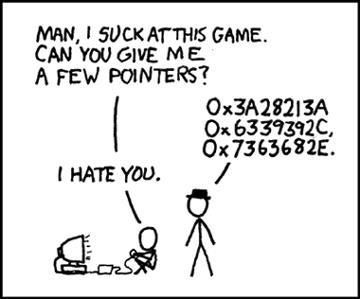
Figure 3. Created by Randall Munroe, xkcd is an iconic stick-figure webcomic famously described as a series of “romance, sarcasm, math, and language.”
Dereferencing or comparing an uninitialised pointer is undefined behaviour, and by chance its bit pattern could appear to match a valid address. In contrast, a pointer set to nullptr has a well-defined, safe value that always indicates “no object”.
We can set a pointer p to null using:
p = nullptr;The C++ standard guarantees that nullptr is always available because it is a core language feature. Its type is std::nullptr_t, defined in the <cstddef> header.
For comparison, older code often used the macro NULL, which is defined in C headers such as <cstdlib>. In modern C++, nullptr is preferred.
Example:
#include <cstdlib>   // for NULL#include <cstddef>   // for std::nullptr_t
int main() {    int *p = nullptr;  // modern and type-safe    int *q = NULL;     // legacy, not recommended}
Knowledge Check
Section titled “Knowledge Check”Which of the following are considered best practices when using namespaces in large-scale C++ projects?
What are the primary advantages of using Doxygen for C++ documentation?
Modern Function Signatures
Safe String Searching
Pointer Arithmetic and Types
Pass by Reference Mechanism
© 2026 Derek Molloy, Dublin City University. All rights reserved.