
6.2 STL

Standard Template Library (STL)
Section titled “Standard Template Library (STL)”STL Introduction
Section titled “STL Introduction”The Standard Template Library (STL) makes extensive use of C++ templates to provide a standardised, extensible, and reusable code base for building complex software applications. The STL encourages programmers to develop code that is solid, robust, and easily reusable. It is highly extensible, allowing programmers to add their own containers and algorithms if required.
All C++ library entities are declared or defined in one or more standard headers. To use a library component in a program, you include the relevant standard header using an #include directive. For example:
#include <iostream> // include I/O facilitiesAll names (except operator new and operator delete) in the C++ standard library are defined within the std namespace or a namespace nested inside std. For example, the standard input stream is accessed as std::cin. Alternatively, you can bring all standard library names into the current namespace by writing:
using namespace std;Placing this declaration after all include directives brings the library names into the global namespace. Unless explicitly permitted, you may not define names in the std namespace or in any of its nested namespaces.
While the STL is highly powerful, it is not always suitable for very low-power embedded devices (such as IoT sensor leaf nodes) where resources are severely constrained. In particular, the overhead associated with templates, iterators, and certain classes (such as std::string) can be significant. On such devices, simpler alternatives such as plain C-style strings are often preferred. However, for more capable embedded platforms like the Raspberry Pi or BeagleBone, this is generally not a concern, as the additional code size incurred by STL usage may only be in the range of 1–2 MB.
The STL is broadly organised into the following key components:
- Containers: Data structures that provide built-in memory management.
- Iterators: Interfaces that allow algorithms to access and traverse containers.
- Algorithms: Functions that manipulate data through iterators, providing operations such as searching, sorting, and modifying collections.
STL Containers
Section titled “STL Containers”In previous exercises we examined the use of an array for the storage of objects. While an array is a container, it notably lacks advanced memory management capabilities. For instance, if we had an array of 10 elements and the middle one needed to be removed, how would the array be altered to address this gap? Similarly, how could we efficiently extend it if we needed to add 12 more elements? More than likely, the programmer would have to write the logic for these memory management routines, which is complex and prone to unnecessary error.
Containers are data structures that include memory management capabilities. There are two categories of containers: sequential containers and associative containers. Some examples of sequential containers are (See Table 1 for a full list):
vector: A flexible array of elements.deque: A dynamic array that can grow at both ends.list: A doubly linked list.span(C++20): A non-owning view over a contiguous sequence of objects. It is ideal for passing arrays or vectors to functions without copying or losing size information.
STL vectors are a good solution to the array problem just discussed. They are as easy to declare as an array and are automatically dynamically resized during program execution.
Associative containers associate a value with a name and some examples are:
map: A collection of name-value pairs, sorted by the keys value.set: A collection of elements sorted by their own value.multimap: Same as amap, only duplicates are permitted.multiset: Same as aset, only duplicates are permitted.
🎬Demo: Visualising STL Containers
Section titled “🎬Demo: Visualising STL Containers”Here is a simple animation of the different standard STL Containers, showing you important features of each.
STL Container Shapes
The same five values, drawn in the shape of each container so you can see where you are allowed to reach in.
Table 1. Summary of C++ STL Container Types
| Container Type | Typical Use | Unique Features |
|---|---|---|
| vector | Dynamic array where fast random access is needed. | - Fast indexed access (O(1)) - Automatically resizes - Contiguous memory layout std::vector<int> v; |
| list | Doubly linked list for frequent insertions/removals in the middle. | - Fast insertion/removal at any position (O(1)) - No random access - More memory overhead std::list<int> l; |
| forward_list | Singly linked list (more memory-efficient than list). | - Only forward iteration - Lower memory overhead - Limited operations std::forward_list<int> fl; |
| deque | Double-ended queue for fast insertions/removals at both ends. | - Fast push/pop at front and back - Random access supported - Non-contiguous memory std::deque<int> d; |
| array | Fixed-size array with STL interface. | - Size fixed at compile-time - Safer alternative to C arrays - Fully compatible with STL algorithms std::array<int, 5> arr; |
| span (view, C++20) | Non-owning view over any contiguous sequence (array, vector, or raw buffer). Does not own or copy the data. | - Zero-cost: stores only a pointer and a length - Works with STL algorithms - Avoids unnecessary copies when passing sequences to functions std::span<int> s(arr); |
| stack | LIFO stack (adapter container). | - Built on top of deque by default - Only top element accessible std::stack<int> s; |
| queue | FIFO queue (adapter container). | - Built on top of deque by default - Only front and back accessible std::queue<int> q; |
| priority_queue | Heap-based queue for accessing largest/smallest element quickly. | - Supports custom comparators - Always keeps top element accessible std::priority_queue<int> pq; |
| set | Sorted collection of unique elements. | - Automatically sorted - Fast lookup (O(log n)) - No duplicates allowed std::set<int> s; |
| multiset | Sorted collection allowing duplicates. | - Like set but allows duplicates - Sorted automatically std::multiset<int> ms; |
| unordered_set | Hash-based unique element collection. | - Very fast lookup (average O(1)) - No order guarantee - No duplicates std::unordered_set<int> us; |
| map | Sorted key-value pairs with unique keys. | - Fast lookup by key (O(log n)) - Automatically sorted by key - Key uniqueness enforced std::map<std::string, int> m; |
| multimap | Sorted key-value pairs allowing duplicate keys. | - Like map but allows duplicate keys - Automatically sorted std::multimap<std::string, int> mm; |
| unordered_map | Hash-based key-value store. | - Very fast lookup (average O(1)) - No order guarantee - Key uniqueness enforced std::unordered_map<std::string, int> um; |
🎬Code Demo: Vector Growth (C++ vs. Rust)
Section titled “🎬Code Demo: Vector Growth (C++ vs. Rust)”This demo shows the growth of std::vector as elements are added and removed. There is a Rust option to view the equivalent Rust code, but we revisit this later in the book, so you can ignore this on your first pass of this text.
Vector Growth & Invalidation Lab
🧩Knowledge Check
Section titled “🧩Knowledge Check”Match the STL Containers
Basic Vector Operations
Which namespace contains almost all standard library entities, such as 'cin' and 'vector'?
What is a key advantage of STL containers over traditional C-style arrays?
STL Iterators
Section titled “STL Iterators”Iterators play a pivotal role in enabling generic programming, particularly when working with different container types. While containers are responsible for the storage and organisation of elements, iterators act as intermediaries, providing a consistent and unified way to access and navigate through the elements within those containers.
Consider the diversity of STL containers, ranging from sequential containers like std::vector and std::list to associative containers such as std::map and std::set. Each of these containers employs distinct underlying data structures to manage its elements. For instance, a std::vector typically stores elements in contiguous memory locations, allowing for efficient random access, whereas a std::list utilises a doubly-linked list structure, facilitating efficient insertion and deletion at any point.
Despite these fundamental differences in their internal organisation, the STL aims to provide a high degree of abstraction, allowing programmers to interact with containers in a generic manner without needing to be intimately familiar with their specific implementation details. This is where iterators come into play.
An iterator can be thought of as an object that abstracts the process of traversing the elements of a container. It essentially acts like a pointer, allowing you to point to an element within the container and then move to the next or previous element, depending on the type of iterator and the container it is associated with.
The key advantage of using iterators is that they provide a common interface for accessing elements across different container types. This uniformity makes it possible to write generic algorithms that can operate on a wide range of containers, as long as those containers provide iterators that support the necessary operations for the algorithm. For example, a generic find algorithm can be implemented using iterators to search for a specific element within any container that provides forward iterators, regardless of whether it’s a vector, a list, or another suitable container type. This promotes code reusability and flexibility. Programmers can leverage a rich set of pre-built algorithms and apply them to various container types without needing to rewrite the algorithms for each specific container. This significantly simplifies software development and enhances the overall efficiency and maintainability of C++ code.
In essence, STL iterators bridge the gap between the structure of containers and the algorithms that operate on them. They provide the necessary level of abstraction to build a powerful and flexible framework for working with collections of objects in C++.
🎬Demo: Visualising STL Iterators
Section titled “🎬Demo: Visualising STL Iterators”Here is a simple animation of the different standard STL Iterators, showing you important features of each.
STL Iterator Categories
An iterator is a position that knows how to move. Its category fixes which moves it can make, and the container you took it from decides the category.
Input iterators
An input_iterator is a read-only, single-pass iterator that moves forward. It can only be used to read elements, and once an element is read, it cannot be reliably re-read by decrementing the iterator. Think of it like reading from a data stream. (See inputIterator.cpp)
#include <iostream>#include <iterator> // For std::istream_iterator
int main() {    // Reads integers from standard input    std::istream_iterator<int> input_it(std::cin);    std::istream_iterator<int> end_it; // Default constructor is end-of-stream
    if (input_it != end_it) {        std::cout << "First input: " << *input_it << std::endl;        ++input_it; // Move forward, cannot go back    }    return 0;}
This gives the following output, where 1 and 2 are typed as inputs by the caller:
molloyd@OfficePC-Ubuntu:/tmp$ g++ init.cpp -o initmolloyd@OfficePC-Ubuntu:/tmp$ ./init1First input: 12Output Iterator
An output_iterator is a write-only, single-pass iterator that moves forward. It can only be used to write elements, and once an element is written, the previous position cannot be accessed for further writing. Think of it like writing to a data stream. (See outputIterator.cpp)
#include <iostream>#include <iterator> // For std::ostream_iterator#include <vector>#include <algorithm> // For std::copy
int main() {    std::vector<int> numbers = {10, 20, 30};
    // Writes integers to standard output, separated by a space    std::ostream_iterator<int> output_it(std::cout, " ");
    // Copies elements from numbers to standard output    std::copy(numbers.begin(), numbers.end(), output_it);    std::cout << std::endl;    return 0;}
This gives the following output:
molloyd@OfficePC-Ubuntu:/tmp$ g++ outit.cpp -o outitmolloyd@OfficePC-Ubuntu:/tmp$ ./outit10 20 30Forward iterators
A forward_iterator is a read/write, multi-pass iterator that moves only forward. Unlike input/output iterators, it can be dereferenced multiple times at the same position and can be used in multiple passes over a range. (See forwardIterator.cpp)
#include <iostream>#include <forward_list> // For std::forward_list
int main() {    std::forward_list<int> fl = {10, 20, 30};    auto it = fl.begin();
    // Read and modify    *it = 15; // OK: Can read and write
    // Multi-pass (if needed, though not explicit here)    // std::cout << *it << std::endl; // Can re-read
    ++it; // Move forward    std::cout << "Second element: " << *it << std::endl;    return 0;}
This gives the following output:
molloyd@OfficePC-Ubuntu:/tmp$ g++ forward.cpp -o forwardmolloyd@OfficePC-Ubuntu:/tmp$ ./forwardSecond element: 20Bidirectional iterators
A bidirectional_iterator is a read/write, multi-pass iterator that can move both forward and backward. This makes it much more flexible for algorithms that need to traverse a range in both directions. (See bidirectionalIterator.cpp)
#include <iostream>#include <list> // For std::list
int main() {    std::list<int> l = {100, 200, 300};    auto it = l.begin(); // Points to 100
    ++it; // it points to 200    std::cout << "Current element: " << *it << std::endl;
    --it; // OK: Can move backward, it points back to 100    std::cout << "Previous element: " << *it << std::endl;    return 0;}
This gives the following output:
molloyd@OfficePC-Ubuntu:/tmp$ g++ bi.cpp -o bimolloyd@OfficePC-Ubuntu:/tmp$ ./biCurrent element: 200Previous element: 100Random iterators
Random access iterators are the most powerful category of iterators in C++, offering all the functionalities of other iterator categories (input, output, forward, and bidirectional iterators) along with the crucial ability to access elements at any arbitrary position within the sequence in constant time. This capability distinguishes them and provides significant flexibility and efficiency for various operations. (See randomIterator.cpp)
#include <iostream>#include <vector>
int main() {    std::vector<int> numbers = {10, 20, 30, 40, 50};    auto it = numbers.begin() + 3; // Random access to the 4th element    std::cout << "Element at index 3: " << *it << std::endl; // Output: 40    return 0;}
This gives the output:
molloyd@OfficePC-Ubuntu:/tmp$ g++ rand.cpp -o randmolloyd@OfficePC-Ubuntu:/tmp$ ./randElement at index 3: 40Figure 1 relates these iterators by their relative complexity.
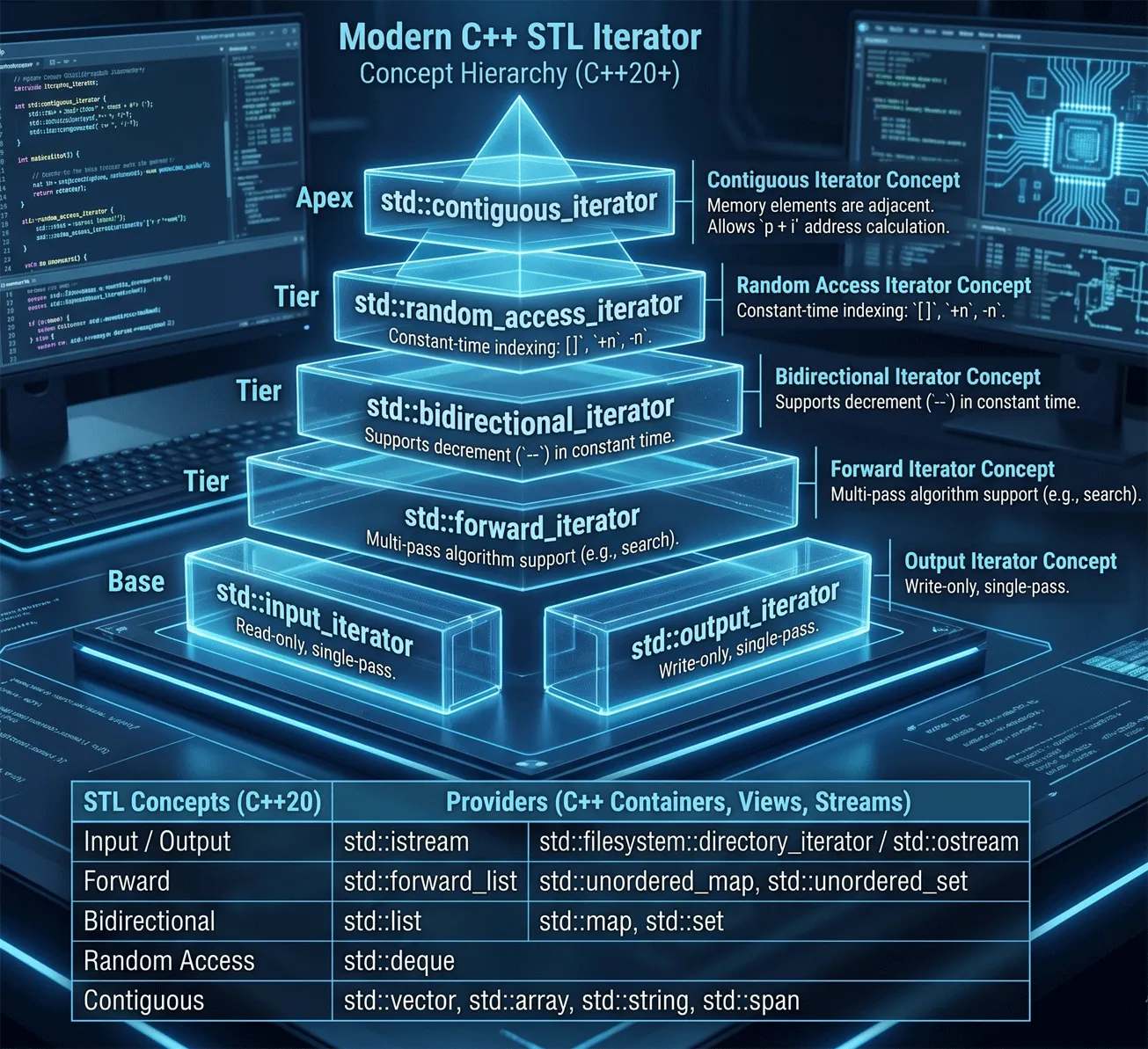
Iterators are abstract, requiring a class that implements the methods for use as the iterator. Input and Output iterators are the simplest form of iterators (being simple iterator interfaces to the iostream classes, with the random access iterator being the most complex, and by definition, it has implemented the other iterator categories.
🧩Knowledge Check
Section titled “🧩Knowledge Check”Match the Iterator Categories
Why are iterators considered essential for generic programming in the STL?
What is a significant limitation of a 'bidirectional_iterator' compared to a 'random_access_iterator'?
STL Algorithms
Section titled “STL Algorithms”Algorithms provide a way to access and manipulate data in containers using the iterator interface. The algorithms can even implement a for_each loop.
The algorithms can be classified as:
- Non-modifying algorithms: e.g.,
for_each,count,search… - Modifying algorithms:
for_each,copy,transform… - Removing algorithms:
remove,remove_if, … - Mutating algorithms:
reverse,rotate, … - Sorting algorithms:
sort,partial_sort, … - Sorted range algorithms:
binary_search,merge… - Numeric algorithms:
accumulate,partial_sum…
A full table of C++ STL Algorithms is provided in Table 3 in the Appendix of Section 6.4.
Modern Algorithms: C++20 Ranges
Section titled “Modern Algorithms: C++20 Ranges”C++20 introduced the Ranges library, which significantly improves how we work with algorithms. Traditional algorithms require passing two iterators (begin and end), which is verbose and error-prone. Ranges allow you to pass the container itself:
#include <vector>#include <algorithm>#include <ranges>
std::vector<int> v = {3, 1, 4, 1, 5, 9};std::ranges::sort(v); // Much cleaner: no .begin() and .end()
Ranges also support views and pipe composition, allowing you to transform and filter data lazily and efficiently:
auto results = v | std::views::filter([](int n) { return n % 2 == 0; }) | std::views::transform([](int n) { return n * n; });This functional-style programming is highly expressive and can lead to more maintainable code in complex data processing tasks.
STL by Example
Section titled “STL by Example”A for_each example
The for_each loop condenses the for loop into a single line. This single line iterates through the vector and executes a function at every element within the vector. The function outputFunction receives the element type the vector was specialised with at compile time. The function can do anything, but in this case, it simply prints to the standard output. (See for_eachExample.cpp)
#include <iostream>#include <vector>#include <algorithm> // Required for std::sort and std::for_each
using namespace std;
// declare a simple function that outputs an intvoid outputFunction(int x) {    cout << x << endl;}
int main(void) {    // Define a simple C-style array of ints    int input_array[] = {50, 20, 40, 10, 30};    // Calculate the number of elements in the array    int array_size = sizeof(input_array) / sizeof(input_array[0]);
    // Declare a vector container of ints    vector<int> vect;
    // Populate the vector from the simple C-style array    for (int i = 0; i < array_size; ++i) {        vect.push_back(input_array[i]);    }
    // Sort the vector    sort(vect.begin(), vect.end());    cout << "Sorted output of numbers:" << endl;
    // Loop through vector with for_each loop and execute    // outputFunction() for each element    for_each(vect.begin(), vect.end(), outputFunction);
    return 0;}
This gives the following output:
Sorted output of numbers:1020304050This can be applied to an object of our own type — an example is listed in for_eachFish.cpp and reproduced in the next example. This is a basic example of using vectors with your own type. If you wish to use STL algorithms then your type must provide certain additional functionality to allow you to define the behaviour of your type with certain operations, in particular < and == are often required. An example is given in for_eachFishSort.cpp that demonstrates the use of the required overloaded operators. Note that the const after a method declaration states that this method can be called on a constant object, as it bans the method from modifying the state of Fish through compiler checks (”… in read-only structure” error). Note also that Fish objects are being added to the vector, not just string names.
#include <iostream>#include <vector>#include <algorithm> // Required for std::for_each#include <string>using namespace std;
// --- Fish Class Definition ---class Fish {private:  string name;public:  // Constructor to initialize the fish's name  Fish(string nm) : name(nm) {}
  // Method to display fish information  void display() const { // Add const to indicate it doesn't modify the object    cout << "I am a fish and my name is " << name << endl;  }};
void outputFunction(Fish x) {  x.display();}
int main(void) {    // Declare a vector container of Fish objects    vector<Fish> fishTank;
    // Add three fish of different names directly to the vector    fishTank.push_back(Fish("Nemo"));    fishTank.push_back(Fish("Dory"));    fishTank.push_back(Fish("Marlin"));    cout << "Here are the fish in your tank:" << endl;
    // loop through vector with for_each loop and execute    // outputFunction() for each element    for_each(fishTank.begin(), fishTank.end(), outputFunction);    return 0; // Indicate successful execution}
This gives the following output:
Here are the fish in your tank:I am a fish and my name is NemoI am a fish and my name is DoryI am a fish and my name is MarlinAnd with the sort function, the overloaded operators need to be added to the for_eachFishSort.cpp file:
#include <iostream>#include <vector>#include <algorithm> // Required for std::for_each#include <string>using namespace std;
// --- Fish Class Definition ---class Fish {private:  string name;public:    // Constructor to initialise the fish's name    Fish(string nm) : name(nm) {}
    // Method to display fish information    void display() const { // Add const to indicate it doesn't modify the object       cout << "I am a fish and my name is " << name << endl;    }    // --- Comparison Operators for Sorting ---    // operator< for less-than comparison (used by std::sort)    bool operator<(const Fish& other) const {        return this->name < other.name; // Compare names lexicographically    }
    // operator== for equality comparison    bool operator==(const Fish& other) const {        return this->name == other.name; // Compare names for equality    }};
void outputFunction(Fish x) {  x.display();}
int main(void) {    // Declare a vector container of Fish objects    vector<Fish> fishTank;
    // Add three fish of different names directly to the vector    fishTank.push_back(Fish("Nemo"));    fishTank.push_back(Fish("Dory"));    fishTank.push_back(Fish("Marlin"));    cout << "Here are the fish in your tank:" << endl;
    // Sort the vector of Fish objects    // std::sort will now use the operator< defined in the Fish class    sort(fishTank.begin(), fishTank.end());
    // loop through vector with for_each loop and execute    // outputFunction() for each element    for_each(fishTank.begin(), fishTank.end(), outputFunction);    return 0; // Indicate successful execution}
Once the operator< has been included the sort() call will function correctly. Compiling and executing the code above gives the following output, where the fish objects are sorted by their names:
Here are the fish in your tank:I am a fish and my name is DoryI am a fish and my name is MarlinI am a fish and my name is NemoPlease note that operator < (less-than) is the only strict requirement for std::sort. It is generally considered good practice to implement operator == (and sometimes other comparison operators like !=, >, <=, >=) when you define operator <. This is for logical consistency and because other standard library algorithms or containers may rely on them. For example, std::find uses operator ==. So, in the Fish example, if you just wanted to sort and display, operator < would be sufficient. But if you later wanted to search for a specific fish by name using std::find(fishTank.begin(), fishTank.end(), Fish("Nemo"));, you would need operator == to be defined for Fish objects.
🎬Demo: STL Fish
Section titled “🎬Demo: STL Fish”Here is a fun animation of the output:
Sorting a Tank of Fish
One tank, three STL ideas: a vector holds the fish, std::sort reorders them with the class's own operator<, and std::for_each visits each one.
Function Objects (Advanced)
Section titled “Function Objects (Advanced)”What is a functor, or function object? Essentially, it is a class declared with the () operator overloaded. First, we declare a class. Next, we overload the () operator with as many parameters as we want, and then we simply instantiate it. Why would we do something so complicated? Bjarne Stroustrup, the creator of C++, says that, “Function objects often execute faster.” Since C++ was developed with robustness and efficiency in mind, the creators of STL felt that the use of functors would be an ideal way to maintain the performance for the algorithms implemented.
Implementing the previous example using functors (see functionObject1.cpp):
#include <iostream>#include <vector>#include <algorithm>using namespace std;
// declare a function object using a structstruct func  {    void operator()(int x) {        cout << x << endl;    }};
int main(void) {    int x;    vector<int> vect;  // declare a vector container of ints
    cout << "Please enter a list of numbers:" << endl;    while(cin >> x) {      vect.push_back(x);    }    sort(vect.begin(), vect.end());   // sort the array    cout << endl << "Sorted output of numbers:" << endl;
    // loop through vector with for_each loop and execute the function    //  object for each element    for_each(vect.begin(), vect.end(), func());}
So in this example the function object funct() was passed to the for_each() algorithm, just like an object! This is a very useful facility in C++. as we can use the same for_each() algorithm for an unlimited number of applications.
Please enter a list of numbers:1284a
Sorted output of numbers:1248
Finally, for completeness, we can implement the previous example using functors and templates:
#include <iostream>#include <vector>#include <algorithm>using namespace std;
// declare a function object using a templatetemplate<class T> class func {    public:      void operator()(T x) {          cout << x << endl;      }};
int main(void) {    int x;    vector<int> vect;  // declare a vector container of ints
    cout << "Please enter a list of numbers:" << endl;    while(cin >> x) {        vect.push_back(x);    }
    sort(vect.begin(), vect.end());   // sort the array    cout << endl << "Sorted output of numbers:" << endl;
    // loop through vector with for_each loop and execute the function    // object for each element    for_each(vect.begin(), vect.end(), func<int>());}
This gives the same output as the struct functor version above:
Please enter a list of numbers:1284a
Sorted output of numbers:1248
🧩Knowledge Check
Section titled “🧩Knowledge Check”Using std::ranges::sort
What is the primary benefit of the Ranges library introduced in C++20?
In the context of the STL, what exactly is a 'functor' (function object)?
© 2026 Derek Molloy, Dublin City University. All rights reserved.