
8.1 More Rust Fundamentals

Managing Larger Projects, Using Collections, Generics and Handling Errors.
Section titled “Managing Larger Projects, Using Collections, Generics and Handling Errors.”Introduction
Section titled “Introduction”You have now established an understanding of Rust’s core syntax, including variables, mutability, data types, functions, and control flow. To build larger systems, we must examine Rust’s mechanisms for code organisation, dynamic data management, error handling, and abstraction. This chapter describes these concepts, showing how they allow you to write reliable and maintainable code for edge programming and computer architectures.
We begin by exploring Packages, Crates, and Modules. Just as C/C++ projects rely on file structures and build systems like CMake, Rust uses Cargo to manage:
- packages (the project container),
- crates (the units of compilation, such as executables or libraries), and
- modules (for internal code organisation and visibility). Understanding this hierarchy is necessary for structuring edge applications, promoting code reuse, and managing compilation times.
In the next section, we examine Managing Data with Collections, focusing on Vec, String, and HashMap. While C/C++ offers std::vector, std::string, and std::unordered_map, Rust’s equivalents integrate with its ownership model to provide memory safety for dynamic data structures. We also discuss how these collections manage heap allocation in memory-constrained environments.
Error Handling is required for autonomous edge devices to operate reliably. Rust’s approach uses the Result<T, E> enum for recoverable errors and the panic! macro for unrecoverable bugs, requiring you to address potential failures at compile time. This contrasts with C/C++‘s reliance on return codes or exceptions. We also cover Option<T>, Rust’s alternative to nullptr.
Finally, we examine Generics, Traits, Lifetimes, Closures, and Iterators. Generics and traits enable abstract and reusable code, similar to C++ templates and interfaces. Lifetimes ensure references always point to valid data, eliminating dangling pointers. Closures are anonymous functions that capture variables from their scope safely. Iterators provide data-processing pipelines (such as map, filter, and collect) that compile to efficient loops, suitable for edge applications.
By the end of this chapter, you will understand how these features provide safety, performance, and control for complex systems.
Packages, Crates, and Modules
Section titled “Packages, Crates, and Modules”Introduction: Structuring Large Rust Projects
Section titled “Introduction: Structuring Large Rust Projects”In C/C++ you organise code into files and directories, using build systems like CMake or Make. Rust provides a system for structuring code built around Packages, Crates, and Modules. This system is integrated with Cargo and is designed for clarity and efficient compilation. Understanding these units is necessary for building maintainable Rust applications.
Packages: The Project Container
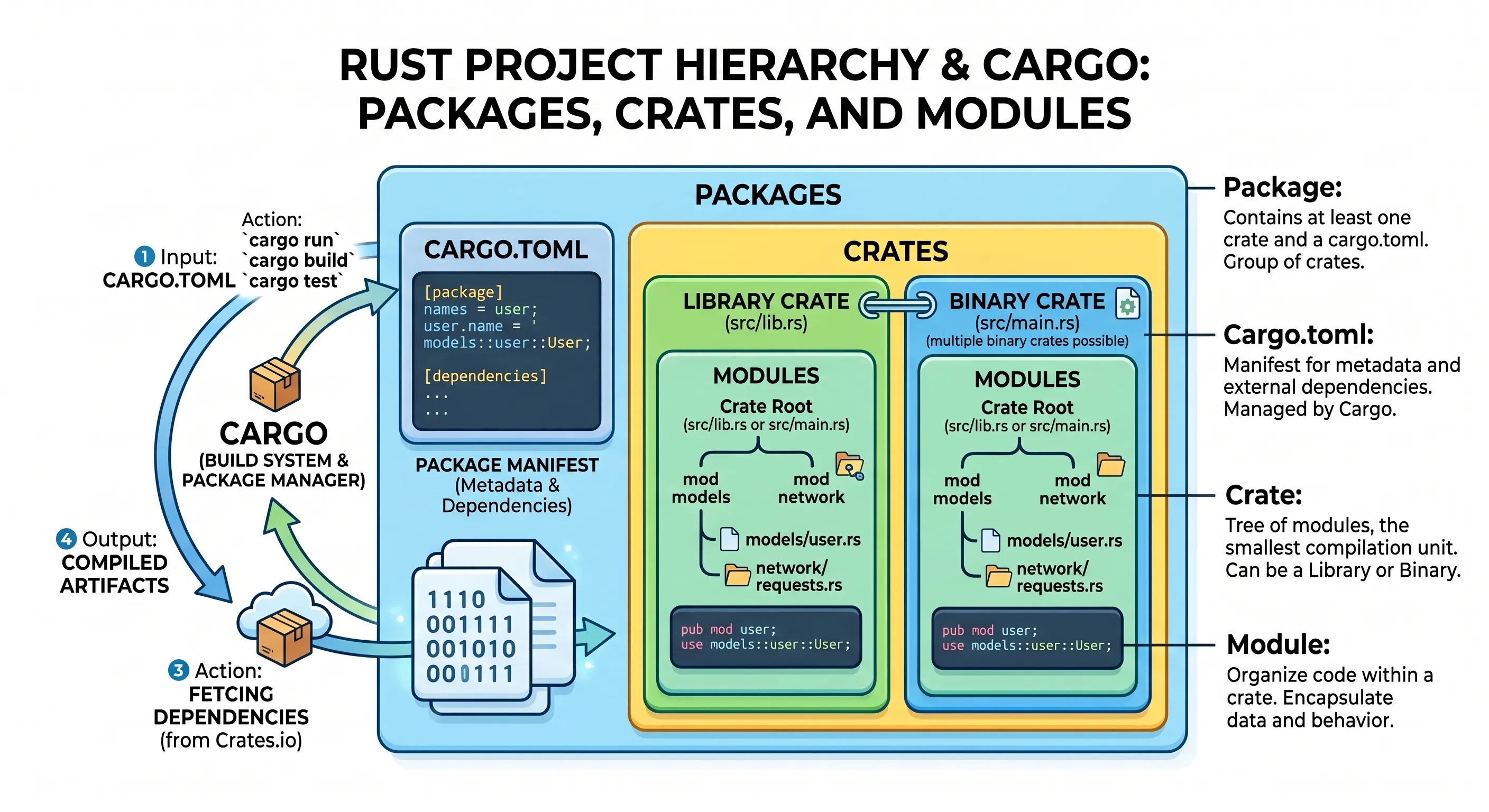
Section titled “Packages: The Project Container”In Rust, a package is the highest-level unit of code organisation. It is a bundle of one or more crates that provides a set of functionality, akin to a complete project or a repository in C/C++ development. Every Rust project you create with Cargo starts as a package.
Definition and Cargo.toml
A package is defined by the presence of a Cargo.toml file in its root directory. This file serves as the manifest for your project, containing metadata such as the package’s name, version, authors, and its dependencies on other crates. Cargo uses this file to understand how to build, test, and run your code.
Creating a Package
When you initialise a new Rust project using cargo new, you are creating a new package. By default, cargo new creates a binary package, which is an executable application. You can create a Cargo Application (binary) Package or a Cargo Library Package:
- Cargo Application (Binary) Package: To create an executable program that can be run directly. This could be a command-line tool, a web server, a desktop application, or any other standalone program. By convention, the entry point for an application package is the
src/main.rsfile, which must contain amain()function. The program’s execution begins here. Note that you can have multiple binary entry points by placing files insrc/bin/. When you build an application package (usingcargo build), Cargo compiles it into an executable file. On Linux and macOS, this will be a binary file, and on Windows, it will be an.exefile. Its primary role is to be the final, runnable product. - Cargo Library Package: To provide reusable code and functionality that other packages (both applications and other libraries) can depend on. It is not meant to be run on its own. A library package’s root is, by convention, the
src/lib.rsfile. It does not have amainfunction. Instead, it exposes a public API (functions, structs, enums, etc.) that other packages can use. When you build a library package (cargo build), it compiles into an intermediate representation (an.rlibfile by default) that can be linked against by other packages. It does not produce a standalone executable. Library packages are designed to be included as dependencies in other projects.
Rust Example: Creating a Binary Package
$ cargo new my_rust_app Created binary (application) `my_rust_app` package$ ls my_rust_appCargo.tomlsrc$ ls my_rust_app/srcmain.rsThis command creates a directory my_rust_app with a Cargo.toml file and a src/main.rs file. Cargo automatically recognises src/main.rs as the “crate root” for a binary crate named my_rust_app. You can also explicitly create a library package using the --lib flag.
Rust Example: Creating a Library Package
$ cargo new my_rust_lib --lib Created library `my_rust_lib` package$ ls my_rust_libCargo.tomlsrc$ ls my_rust_lib/srclib.rsHere, src/lib.rs is recognised as the crate root for a library crate named my_rust_lib.
A single package can contain:
- At most one library crate (
src/lib.rs). - As many binary crates as you like (typically
src/main.rsand additional binaries insrc/bin/).
In C/C++, a package is conceptually similar to a project directory containing a CMakeLists.txt or Makefile. The Cargo.toml file plays a role analogous to these build configuration files, defining how the project is built and what its dependencies are.
Crates: The Compilation Unit
Section titled “Crates: The Compilation Unit”A crate is the smallest amount of code that the Rust compiler (rustc) considers at a time. It is the fundamental unit of compilation and linking in Rust. A package must contain at least one crate (either a library or a binary). It can have at most one library crate but can have multiple binary crates.
Every time you compile a Rust project, you are compiling one or more crates. A crate consists of a tree of modules (discussed next) that are all compiled together.
Binary Crates
A binary crate is an executable program. It must have a main function, which serves as the entry point for the executable. All the basic Rust programs you’ve written so far (e.g., "Hello, world!") are binary crates. A binary crate is analogous to a C/C++ executable (e.g., .exe on Windows or a no extension binary with the executable flag set on Linux/macOS).
Simple Binary Crate (src/main.rs)
fn main() { println!("Hello, binary crate!");}Library Crates
A library crate does not have a main function and does not compile into an executable. Instead, it defines functionality (functions, structs, enums, traits, etc.) that is intended to be shared and reused by other projects (other binary or library crates).
Rust Example: Simple Library Crate (src/lib.rs)
/// Adds two numbers.pub fn add(a: i32, b: i32) -> i32 {    a + b}
/// Subtracts two numbers.pub fn subtract(a: i32, b: i32) -> i32 {    a - b}
Other crates can then depend on this library crate and use its publicly exposed functions. A library crate is analogous to a C/C++ static library (.a or .lib) or a shared/dynamic library (.so or .dll) depending on the operating system used.
Modules: Organising Code and Controlling Visibility
Section titled “Modules: Organising Code and Controlling Visibility”Modules are the primary way to organise code within a crate. They allow you to partition your code into logical units, control the scope of items, and manage their privacy (i.e., what parts of your code are accessible from where). Modules act as containers for functions, structs, enums, constants, and even other nested modules. Their main purposes are:
- Organisation: Grouping related code together.
- Encapsulation/Privacy: Hiding implementation details and exposing only necessary public interfaces.
Modules are defined using the mod keyword. The content of a module is placed within curly braces {}, and module names typically follow “snake_case” formatting.
Rust modules and C++ namespaces / header-source structure / modules (C++20) all exist to organise code, control visibility, and manage symbol scope, but they differ somewhat in philosophy and enforcement.
Rust Example: Inline Module Definition (Similar to C++ namespaces)
// src/lib.rs or src/main.rsmod math_operations {                   // Declares a module named math_operations    pub fn add(a: i32, b: i32) -> i32 { // This function is public within this module        a + b    }
    fn internal_helper() {              // This function is private by default        println!("This is an internal helper function.");    }}
fn main() {    // Accessing a public item from a module    let sum = math_operations::add(5, 3);    println!("Sum: {}", sum); // Output: Sum: 8
    // math_operations::internal_helper();    // Not permitted as not pub    // ERROR: function internal_helper is private}
This will give the output:
Sum: 8Privacy and Visibility (pub)
Rust’s module system strictly controls visibility. By default, all items (functions, structs, enums, fields, etc.) are private to their containing module. This means they can only be accessed from within that module or its descendants (child modules at any depth). To make an item visible from outside its module, you must explicitly mark it as pub (public).
Default Privacy
mod my_private_module {    fn secret_function() { // Private by default        println!("Shhh, this is a secret!");    }
    pub struct Data {        value: i32, // Field is private by default, even if struct is public    }
    pub fn public_interface() {        secret_function(); // Accessible within the same module        println!("Public interface called.");    }}
fn main() {    // my_private_module::secret_function(); // ERROR: `secret_function` is private    my_private_module::public_interface(); // OK: `public_interface` is public
    // Cannot use struct literal syntax from outside the module when fields are private.    // let data = my_private_module::Data { value: 10 };    // ERROR: field `value` of struct `Data` is private.    // A public constructor (e.g., pub fn new(v: i32) -> Data) would be needed.    // println!("{}", data.value); // ERROR: `value` field is private}
Public pub
Using pub makes an item accessible from any module that can access its parent module.
mod my_public_module {    pub fn public_function() {        println!("This function is public!");    }
    pub struct PublicData {        pub id: u32, // This field is now public        name: String, // This field is still private    }}
fn main() {    my_public_module::public_function(); // OK    let data = my_public_module::PublicData { id: 1, name: String::from("Test") }; // OK    println!("Data ID: {}", data.id); // OK: `id` field is public    // println!("Data Name: {}", data.name); // ERROR: `name` field is private}
Scoped pub (pub(crate), pub(super), pub(in path))
Rust provides finer-grained control over visibility using scoped pub keywords:
pub(crate): Makes an item visible anywhere within the current crate, but not outside of it. This is useful for helper functions or data structures that are internal to your library or binary but needed across different modules.pub(super): Makes an item visible only to the parent module.pub(self): Makes an item visible only to the current module. This is equivalent to not usingpubat all.pub(in path): Makes an item visible only within a specific module identified by path. path must be a parent module of the item.
Rust Example: Scoped Visibility
mod outer_module {    pub fn outer_public_fn() {        println!("Outer public function.");    }
    pub(crate) fn crate_only_fn() { // Visible anywhere in this crate        println!("Visible only within this crate.");    }
    mod inner_module {        pub(super) fn super_only_fn() { // Visible only in outer_module            println!("Visible only in parent module.");        }
        pub(in crate::outer_module) fn specific_path_fn() {            // Visible only in outer_module            println!("Visible only in specific path.");        }
        fn private_fn() { // Private to inner_module            println!("Private to inner_module.");        }    }
    fn call_inner_functions() {        inner_module::super_only_fn(); // OK        inner_module::specific_path_fn(); // OK        // inner_module::private_fn(); // ERROR: private_fn is private    }}
fn main() {    outer_module::outer_public_fn(); // OK    outer_module::crate_only_fn(); // OK (within the same crate)    // outer_module::inner_module::super_only_fn();    // ERROR: `super_only_fn` is private to `outer_module`}
Bringing Items into Scope (use)
To avoid long paths (e.g., my_crate::some_module::sub_module::my_function), Rust provides the use keyword to bring items into the current scope. This is similar to using namespace in C++ and can be applied to individual items.
mod network {    pub mod http {        pub fn get_request() { /*... */ }        pub fn post_request() { /*... */ }    }    pub mod tcp {        pub fn connect() { /*... */ }    }}
fn main() {    // Without use    network::http::get_request();    // With `use` for a specific function    use network::http::post_request;    post_request();    // With use for a module (brings module into scope, not its contents)    use network::tcp;    tcp::connect();    // With use and * (glob operator) to bring all public items into scope    use network::http::*; // Brings `get_request` and `post_request` into scope    get_request(); // Now directly accessible}
pub use: Re-exporting Items
A common pattern in larger crates is re-exporting items from inner modules using pub use. This makes deeply nested items available at the crate root (or any parent module), creating a clean public API without exposing the internal module hierarchy to callers:
mod sensors;mod network;
// Re-export at the crate root so callers don't need to know the internal structurepub use sensors::TemperatureSensor;pub use network::MqttClient;
A downstream crate can now write use my_crate::TemperatureSensor; instead of use my_crate::sensors::TemperatureSensor;. This pattern is particularly important when publishing crates: the internal module hierarchy is an implementation detail that can change freely, while the re-exported public API remains stable for users.
Testing in Rust
Rust has built-in support for unit tests and integration tests through Cargo — no external test framework is needed.
Unit tests live in the same file as the code they test, inside a module annotated with #[cfg(test)]. This attribute tells the compiler to include the module only when running cargo test, keeping it out of the production binary.
pub fn add(a: i32, b: i32) -> i32 {    a + b}
#[cfg(test)]mod tests {    use super::*; // Import everything from the parent module
    #[test]    fn test_add_positive() {        assert_eq!(add(2, 3), 5);    }
    #[test]    fn test_add_negative() {        assert_eq!(add(-1, -2), -3);    }}
Each function marked #[test] is executed by cargo test. The assert_eq! macro panics (failing the test) if the two values are not equal. There is also assert_ne! for inequality, assert! for a boolean condition, and #[should_panic] to verify that code panics as expected.
Integration tests live in a top-level tests/ directory and test the public API of a library crate from an external perspective — they can only access pub items, exactly as a downstream user would:
my_project/├── Cargo.toml├── src/│ └── lib.rs└── tests/ └── integration_test.rsuse my_project::add; // Uses the public API only
#[test]fn integration_add() { assert_eq!(add(10, 20), 30);}Run all tests — unit, integration, and documentation examples — with a single command: cargo test.
C/C++ Namespaces and Access Control Analogy Rust’s system of packages, crates, and modules provides a way to organise code. Packages, managed by Cargo, serve as project containers. Crates are the units of compilation, distinguishing between executable binaries and reusable libraries. Modules, within crates, provide mechanisms for code organisation, encapsulation, and visibility control.
For C++ engineers, this system offers an approach to project structure with explicit pub markers and granular visibility controls (pub(crate), pub(super), etc.), which provide compile-time guarantees for encapsulation. While Rust’s modules differ from C++‘s merging namespaces, the use and pub use keywords manage scope and public APIs. Understanding these concepts is important for writing maintainable and scalable Rust applications for edge computing and embedded systems. This is summarised in Table 1.
Table 1: Summary of the Differences between Rust and C/C++ Namespaces and Access Controls
| Concept | Rust | C/C++ Equivalent | Key Differences/Notes |
|---|---|---|---|
| Code Grouping | mod (module) | namespace | Rust modules are distinct scopes; C++ namespaces can be merged across files. |
| File Organization | mod module_name; (Rust expects module_name.rs or module_name/mod.rs) | Header (.h/.hpp) and source (.c/.cpp) files | Rust’s file structure directly maps to module hierarchy. |
| Public Access | pub | public: (in class/struct) | Rust struct fields are private by default; C++ struct fields are public by default. |
| Private Access | Default (no pub) | private: (in class/struct) | Rust’s default is private. |
| Scoped Public | pub(crate), pub(super), pub(in path) | No direct equivalent; relies on friend declarations or internal linkage. | Rust offers more granular, compile-time enforced visibility. |
| Bringing into Scope | use path::Item; or use path::*; | using namespace Name; or using Name::Item; | Rust’s use is for specific items or modules; C++ using namespace brings all names. |
🧩Knowledge Check
Section titled “🧩Knowledge Check”Match the Rust Concepts
Which statement correctly describes the relationship between packages and crates? (Remember Figure 1)
What is the default visibility of a function or struct field in a Rust module?
When using the visibility modifier pub(super), where is the item accessible?
In modern Rust (Edition 2018+), if you declare mod network; in src/main.rs, where does the compiler prefer to find the module's code?
What is the effect of the line use std::collections::HashMap;?
© 2026 Derek Molloy, Dublin City University. All rights reserved.