
9.1 GUI Introduction
Introduction to Rust GUI Development
Section titled “Introduction to Rust GUI Development”Developing graphical user interfaces (GUIs) in Rust presents a rapidly evolving landscape. Unlike more established ecosystems where a few dominant frameworks often dictate development practices, the Rust GUI space is characterised by a fast pace of innovation. This constant evolution means that frameworks can become outdated relatively quickly, requiring continuous engagement and adaptation from developers. This contrasts sharply with the more settled choices found in web development, such as React (used for the interactive elements in this book), where a clear preference often emerges. For developers, this fragmentation offers both the challenge of selecting the most appropriate tool and allows for specialisation with a set of options.
The Evolving Landscape of Rust GUI Frameworks
Section titled “The Evolving Landscape of Rust GUI Frameworks”The Rust GUI ecosystem provides a range of approaches, each with distinct philosophies and target use cases. Understanding these cross-platform options is crucial for making informed development decisions.
Tauri is a framework engineered to produce small and fast binaries for a wide array of desktop operating systems, including Windows, Linux, and macOS, with expanding support for mobile platforms like iOS and Android. Its architectural strength lies in its hybrid approach: it leverages familiar web technologies (HTML, CSS, JavaScript) for the user interface, while the application’s core logic is powered by a Rust backend. An advantage of Tauri applications is their minimal distribution size ( often as compact as 600KB). This is achieved by utilising the operating system’s native web renderer, thereby avoiding the overhead of embedding a large runtime environment. Tauri facilitates inter-process communication (IPC) through two mechanisms: a Command system, which enables type-safe, synchronous calls from the frontend to the Rust backend, and an Event system, designed for one-way, asynchronous message passing. These mechanisms ensure clear interaction between the UI and the application logic. Tauri’s architecture is modular, offering flexibility to integrate with various frontend frameworks.
Dioxus is presented as a comprehensive fullstack cross platform app framework for Rust. It adopts a user interface architecture similar to React, allowing developers to build applications for desktop (often integrating with Tauri or experimentally using WGPU/Skia), web, and mobile (iOS, Android) from a single, unified codebase. Dioxus places a strong emphasis on ergonomic state management. A key distinction from Tauri is Dioxus’s native Rust UI rendering, which allows direct system access without the need for IPC, as opposed to Tauri’s reliance on JavaScript or WebAssembly for its UI layer.
Slint is an open-source, declarative GUI toolkit that supports the creation of native user interfaces for applications developed in Rust, C++, JavaScript, or Python. It targets a diverse range of platforms, from embedded systems to desktop and mobile environments. Slint’s UI designs are defined using a custom .slint markup language, which is then compiled directly into native machine code, contributing to its performance characteristics. The framework prioritises lightweight operation, with a runtime footprint of less than 300KB RAM, and features a reactive property system. It also provides robust tooling, including a Live Preview feature and integrated editor support, to enhance the developer experience.
GTK-rs provides safe Rust bindings for the foundational libraries of the GNOME stack, with a particular focus on GTK 4. As a mature and well-established option, it offers comprehensive widget coverage and strong integration with the native aesthetic of Gnome desktop environments. However, GTK-rs is often associated with a steep learning curve, potentially requiring a significant amount of boilerplate code for application development. Its cross-platform compatibility on Windows and Apple systems may not be as streamlined or robust as frameworks that leverage web technologies. GTK-rs applications are inherently event-driven, with their functionality managed by a main event loop that efficiently handles various types of events, from user input to system notifications.
Beyond these primary contenders, the Rust GUI ecosystem includes other notable frameworks such as RustUI, Azul, Conrod, Cacao (macOS-specific), Crux, Cushy, CXX-Qt (which provides Rust bindings to the Qt C++ GUI library), Floem, Xilem, and Ratatui (a Text User Interface, distinct from a Graphical User Interface). Many of these options may be platform-specific, present complex setup challenges, or are currently less mature or actively maintained compared to the more prominent frameworks. I may revisit them in future versions of this module.
To give a concise overview of these diverse options, Table 1 provides a high-level comparison of the currently popular Rust GUI frameworks. This table summarises key characteristics and trade-offs to aid in understanding the broader landscape.
Table 1: High-Level Comparison of Rust GUI Frameworks
| Framework Name | Primary Paradigm | Cross-Platform Support (Desktop) | Key Differentiator/Philosophy | Maturity/Stability | Learning Curve (Rust-specific) |
|---|---|---|---|---|---|
| egui | Immediate Mode | Windows, Linux, macOS | Simplicity, rapid iteration, debugging, visualisation | Evolving/Stable | Moderate |
| Tauri | Webview | Windows, Linux, macOS | Lightweight, secure, web-tech integration, Rust backend | Stable | Low (for frontend), Moderate (for Rust IPC) |
| Dioxus | Declarative (React-like) | Windows, Linux, macOS | Fullstack, hot-reloading, native Rust UI, ergonomic state | Evolving | Moderate |
| Slint | Declarative (DSL) | Windows, Linux, macOS | Designer-friendly, native compilation, low resource usage | Evolving/Stable | Moderate |
| GTK-rs | Retained Mode | Linux (Primary), Windows, macOS | Native Gnome look, mature bindings, comprehensive widgets | Mature | Steep |
Match the Rust GUI Frameworks
Immediate Mode vs. Retained Mode GUIs: A Fundamental Distinction
Section titled “Immediate Mode vs. Retained Mode GUIs: A Fundamental Distinction”A foundational distinction in GUI programming paradigms lies between Immediate Mode GUIs (IMGUI) and Retained Mode GUIs (RMGUI). Understanding this difference is critical for appreciating the design choices and implications of various frameworks.
Immediate Mode GUIs (IMGUI) operate on the principle that the application code responsible for defining and drawing widgets is executed entirely during every single frame redraw. This means that at a typical refresh rate of 60 frames per second, the UI is conceptually rebuilt from scratch each time. In this paradigm, widgets do not persist as distinct, long-lived objects in memory. Instead, their appearance and interaction state are determined and rendered dynamically during each frame’s redraw cycle. This approach significantly simplifies the underlying UI logic, as developers are freed from the complexities of managing a hierarchical widget tree or explicitly registering callbacks for state changes; the UI is simply declared based on the application’s current data state.
A significant advantage of the IMGUI paradigm is its simpler mental model for developers. This is particularly beneficial for applications such as game engines or highly interactive visualisations, where the GUI library requires less intrusive control over direct GPU communication. egui stands as a prominent example of an IMGUI. However, a potential drawback is the risk of performance degradation if not meticulously managed. Since the entire UI is conceptually regenerated during each frame, excessive computation or “heavy lifting” performed on the main thread can lead to an unresponsive user interface and noticeable drops in frame rates. While advanced IMGUI libraries incorporate internal caching mechanisms to mitigate this, the fundamental principle remains focused on per-frame re-drawing. Furthermore, egui’s interaction with asynchronous operations can sometimes introduce performance penalties, particularly in web environments.
Retained Mode GUIs (RMGUI), conversely, operate on the principle that widgets are instantiated once and subsequently “retain” their state and existence throughout their lifecycle. The code responsible for building and updating widgets is executed only when specific changes occur or when a particular part of the UI explicitly requires modification. Developers interact with these persistent widget objects by setting their properties and attaching event handlers to them. This approach can yield superior performance for static or less frequently updated user interfaces, as only the modified elements need to be redrawn. It is also a more traditional and familiar paradigm for developers transitioning from established frameworks such as Java Swing, GTK, or Apple’s Cocoa. The primary challenge with RMGUIs, especially in a language like Rust, lies in managing mutable state and the intricate relationships between numerous persistent objects, which can become complex. RMGUIs typically necessitate explicit callback mechanisms and often involve more boilerplate code for UI definition and interaction.
It is important to recognise that the choice between these paradigms often involves a nuanced trade-off, rather than a simple selection of the “fastest” or “easiest” option. The “simplicity” often attributed to IMGUI primarily pertains to the developer’s mental model of UI updates: developers declare the desired state, and the system handles the rest by rebuilding. However, this conceptual simplicity does not automatically translate to effortless performance, as inefficient updates can still penalise the application. Conversely, the “performance” of RMGUI refers to its rendering efficiency — only redrawing what is absolutely necessary. Yet, this comes at the cost of increased development complexity in managing mutable, persistent UI state, a task that can be particularly challenging within Rust’s strict ownership model. In the context of Rust, IMGUI frameworks like egui offer a compelling solution by abstracting away much of the mutable state management complexity that would otherwise be cumbersome in a retained-mode Rust application. This allows developers to focus on the declarative description of the UI, while the library handles rendering optimisations, making the development process more streamlined and less prone to common Rust-specific challenges related to mutability and borrowing.
Why egui? Rationale for its Selection and Focus
Section titled “Why egui? Rationale for its Selection and Focus”egui (pronounced “e-gooey”) is an immediate mode GUI library specifically designed for Rust. Its core design philosophy centres on providing a simple, fast, and portable toolkit that prioritises ease of use and rapid development. This emphasis on developer experience and conceptual clarity makes it an excellent choice for a university module.
A key strength of egui is its cross-platform portability. It runs natively on major desktop operating systems (Windows, Linux, macOS) and can also be compiled to WebAssembly (WASM) for direct execution within a web browser. This broad compatibility is primarily facilitated by eframe, which serves as the officially recommended framework for building egui applications targeting both native desktop environments and the web. Beyond desktop and web, egui also supports integration with various game engines, such as Bevy.
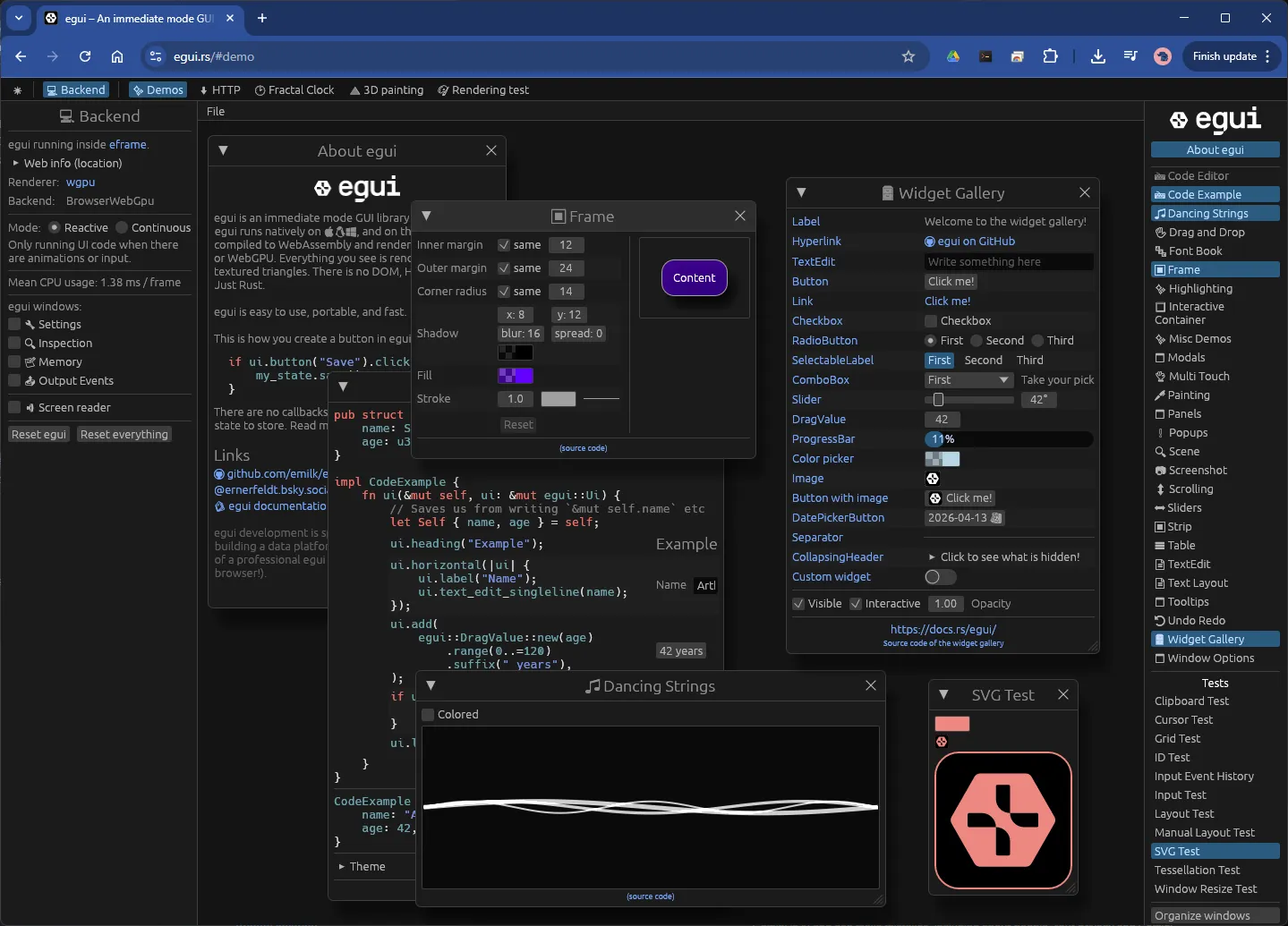
egui’s immediate mode nature renders it useful for debugging purposes and when developing high fidelity products. This characteristic directly aligns with the module’s specific requirement for graphing and advanced graphical visualisation capabilities, as it allows for dynamic and responsive drawing. Figure 1 links to a short demonstration of Rust egui in action, showing quite a versatile set of GUI components.
egui also streamlines UI logic by implicitly rebuilding the user interface during each frame. This approach reduces the need for complex callback management, explicit widget state storage, and synchronisation mechanisms often found in retained-mode GUIs. This inherent simplicity can be particularly advantageous for students learning GUI concepts, as it abstracts away some of the more challenging aspects of traditional state management and event handling.
Despite the rapid pace of change within the Rust GUI landscape, egui maintains a strong position as a well-regarded and actively developed project.
🧩 Knowledge Check
Section titled “🧩 Knowledge Check”In the Immediate Mode GUI (IMGUI) paradigm, how are widgets like buttons or labels typically managed?
Which crate serves as the officially recommended framework for building egui applications targeting both native desktop and web environments?
© 2026 Derek Molloy, Dublin City University. All rights reserved.